
 EN
EN
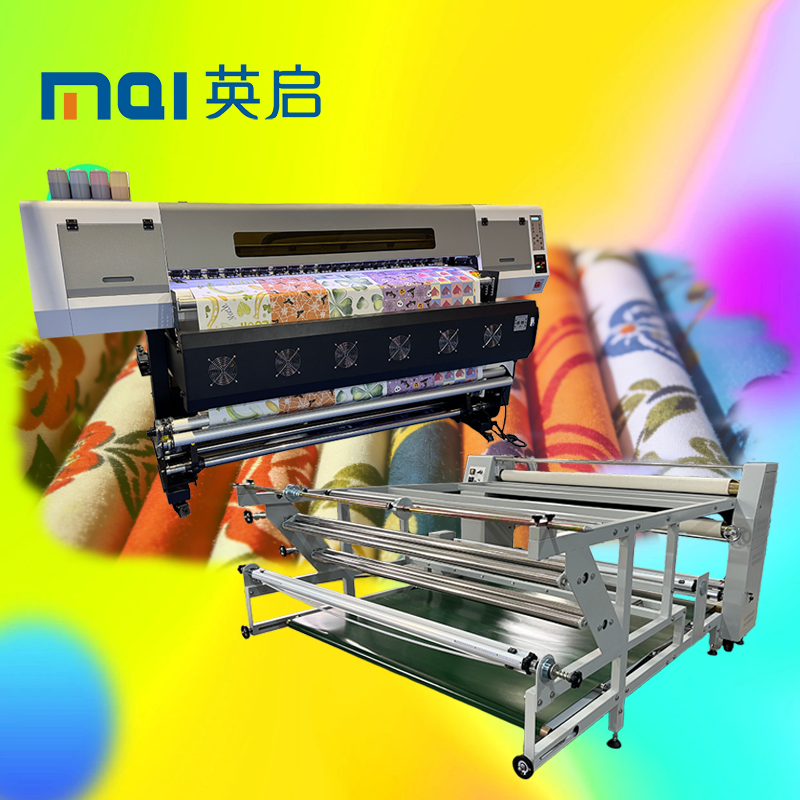
ລາຍລະອຽດທີ່ສຳຄັນຂອງເຄື່ອງພິມ Sublimation ສຳລັບການຖ່າຍໂອນຄວາມຮ້ອນແບບມູນຖານເທິງມູນ
ຄວາມກວ້າງຂອງຜົນຜະລິດ, ຄວາມໄວໃນການພິມ, ແລະ ຄວາມລະອຽດທີ່ສອດຄ່ອງກັບຄວາມຈຸຂອງເຄື່ອງ Calender Press
ການຕັ້ງຄ່າຄວາມກວ້າງຂອງຜົນໄດ້ຮັບຈາກເຄື່ອງພິມ sublimation ໃຫ້ເທົ່າກັບພື້ນທີ່ຖ່າຍໂອນຂອງເຄື່ອງ calender ແມ່ນມີຄວາມສຳຄັນຢ່າງຍິ່ງ. ເມື່ອທັງສອງບໍ່ສອດຄ່ອງກັນຢ່າງຖືກຕ້ອງ, ອາດຈະເກີດການສູນເສຍຄວາມໄວໃນການຜະລິດປະມານ 20% ແລະ ວັດຖຸດິບທີ່ເສຍໄປ. ຄວາມໄວໃນການພິມຈຳເປັນຕ້ອງເຂົ້າກັນໄດ້ດີກັບຄວາມໄວສູງສຸດທີ່ເຄື່ອງ calender ສາມາດຈັດການໄດ້, ໂດຍທົ່ວໄປແລ້ວຢູ່ລະຫວ່າງ 10 ແລະ 25 ແມັດຕີຕໍ່ນາທີ. ນີ້ຊ່ວຍໃຫ້ວັດຖຸເคลື່ອນຜ່ານເຄື່ອງໄດ້ຢ່າງລຽບງ່າຍ ໂດຍບໍ່ເກີດບັນຫາເຊັ່ນ: ບັນຫາຄວາມຕຶງ ຫຼື ການລື້ນໄປໃນຂະບວນການ feed ຈາກມູນ (roll feed). ຜ້າສ່ວນຫຼາຍຈະມີລັກສະນະດີເມື່ອພິມໃນຄວາມລະອຽດລະຫວ່າງ 600 ແລະ 1200 DPI. ແຕ່ຖ້າທ່ານເຮັດວຽກກັບວັດຖຸທີ່ແຂງກວ່າ, ການໃຊ້ຄວາມລະອຽດທີ່ສູງກວ່າ 1200 DPI ຈະເຮັດໃຫ້ເສັ້ນຂອບຊັດເຈນຂຶ້ນຢ່າງເດັ່ນຊັດ ແລະ ລົດບັນຫາການປັບສີທີ່ບໍ່ພ້ອມໃຊ້ຫຼັງຈາກການຖ່າຍໂອນ. ການເລືອກຄວາມລະອຽດທີ່ສູງຂຶ້ນຈະຊ່ວຍຫຼຸດເວລາທີ່ຜ້າຕ້ອງຢູ່ພາຍໃຕ້ຄວາມຮ້ອນລົງໄດ້ປະມານ 30 ເຖິງ 40 ວິນາທີຕໍ່ແມັດຕີ ເນື່ອງຈາກທີ່ສີຈະຕົກຢູ່ໃນບ່ອນທີ່ຄວນ ໂດຍບໍ່ຕ້ອງຜ່ານເຄື່ອງເປັນຈຳນວນຄັ້ງເພີ່ມເຕີມ.
ປະເພດຫัวພິມ: Piezo ແລະ Thermal ສຳລັບການໃສ່ຮອງຢ່າງຕໍ່ເນື່ອງທີ່ເຊື່ອຖືໄດ້
ອຸດສາຫະກຳໄດ້ຕັດສິນໃຈເລືອກໃຊ້ຫົວພິມ piezo ເປັນທາງເລືອກທີ່ດີທີ່ສຸດສຳລັບການພິມ sublimation ປະເພດ roll to roll. ຫົວພິມເຫຼົ່ານີ້ສາມາດຈັດການກັບສາຍສີທີ່ໜາໂດຍບໍ່ມີບັນຫາ, ບໍ່ອຸດຕັນງ່າຍເທົ່າທີ່ຫົວພິມປະເພດ thermal, ແລະມີອາຍຸການໃຊ້ງານຍາວນານປະມານ 2-3 ເທົ່າຂອງຫົວພິມ thermal ກ່ອນຈະຕ້ອງປ່ຽນໃໝ່. ຫົວພິມ thermal ມັກຈະເສື່ອມສະພາບເມື່ອເຮັດວຽກຢ່າງຕໍ່ເນື່ອງ ໂດຍເປັນພິເສດຫຼັງຈາກເຮັດວຽກເປັນເວລາ 8 ຊົ່ວໂມງຕໍ່ມື້, ສິ່ງນີ້ເຮັດໃຫ້ເກີດຄວາມເສຍຫາຍທີ່ບໍ່ຄາດຄິດ ແລະຮີ້ນຮາງຕໍ່ການຈັດຕັ້ງການຜະລິດ. ດ້ວຍເຕັກໂນໂລຢີ piezo, ເຄື່ອງພິມຈະຍັງຄົງສາມາດຈັດສີໄດ້ຢ່າງຖືກຕ້ອງແທ້ຈິງເຖິງແມ່ນຈະເຮັດວຽກຢ່າງຕໍ່ເນື່ອງເປັນເວລາຍາວ, ໂດຍຄວາມເບິ່ງແຍງຄວາມຖືກຕ້ອງຈະຢູ່ພາຍໃຕ້ 0.1 ເປີເຊັນ. ຄວາມຖືກຕ້ອງນີ້ມີຄວາມສຳຄັນເພາະວ່າມັນຊ່ວຍປ້ອງກັນບັນຫາການເກີດແຖວ (banding) ທີ່ເຮັດໃຫ້ເກີດຄວາມເສຍໃຈໃນຂະບວນການ calender processing ທີ່ມີຫຼາຍຂັ້ນຕອນ. ສຳລັບຮ້ານທີ່ພິມຫຼາຍກວ່າ 500 ແມັດຕີຕໍ່ມື້, ການປ່ຽນໄປໃຊ້ຫົວພິມ piezo ສາມາດຫຼຸດຜ່ອນເວລາທີ່ຕ້ອງຢຸດເຄື່ອງເພື່ອບໍາລຸງຮັກສາໄດ້ປະມານ 60 ເປີເຊັນ, ເຊິ່ງໄດ້ຮັບການຢືນຢັນຈາກການທົດສອບຄວາມເຊື່ອຖືໄດ້ຈາກບຸກຄົນທີສາມຫຼາຍຄັ້ງໃນເວລາທີ່ຜ່ານມາ.
ຄວາມເຂົ້າກັນໄດ້ທາງກົລະປະຕິການ ແລະ ອຸນຫະພູມທີ່ສຳຄັນກັບເຄື່ອງອັດຮ້ອນແບບລູກກະດູກ
ເສັ້ນຜ່າສູນກາງຂອງລູກກະດູກ, ຄວາມກວ້າງໃນການຖ່າຍໂອນ, ແລະ ການຄວບຄຸມຄວາມຕຶງເພື່ອປ້ອງກັນການຫຍູ້ນ ແລະ ການເບິ່ງເສັ້ນຂອບທີ່ບໍ່ເປັນປົກກະຕິ
ເມື່ອເສັ້ນຜ່າສູນກາງຂອງລູກກະດິ່ງບໍ່ເທົ່າກັນລະຫວ່າງເຄື່ອງພິມ ແລະ ເຄື່ອງກົດ (calender unit) ສິ່ງຕ່າງໆຈະເລີ່ມເກີດບັນຫາໃນການຈັດການຜ້າທັງໝົດໃນຂະບວນການຜະລິດ. ຜົນທີ່ໄດ້ຮັບ? ບັນຫາການຍືດ, ບັນຫາຜ້າບິດເປັນກະລຸມ (buckling), ຫຼື ເຖິງແຕ່ການເລື່ອນເຂົ້າກັນ (telescoping) ເວລາປ້ອນວັດຖຸເຂົ້າໄປໃນລະບົບ. ການຈັດຕັ້ງຄວາມກວ້າງຂອງການຖ່າຍໂອນ (transfer width alignment) ໃຫ້ຖືກຕ້ອງກໍເປັນສິ່ງທີ່ສຳຄັນຫຼາຍເຊັ່ນກັນ—ມັນຈຳເປັນຕ້ອງຢູ່ໃນຂອບເຂດປະມານ 0.5 ເຊັນຕີແມັດເທີ ຂ້າງໃດຂ້າງໜຶ່ງເພື່ອປ້ອງກັນການລົ້ນຂອງໄອສີ່ (dye vapors) ຈາກເຂດທີ່ບໍ່ໄດ້ຮັບການປິ່ນປົວ. ການລົ້ນເຫຼົ່ານີ້ເຮັດໃຫ້ເກີດຜົນກະທົບຮູບແວວ (halo effects) ທີ່ບໍ່ພ້ອມໃຈຢູ່ແຕ່ລະດ້ານຂອງຮູບພິມ ແລະ ຮຸ້າຍເຖິງການຈັດຕັ້ງທີ່ຖືກຕ້ອງ (registration) ຢ່າງສິ້ນເຊີງ. ການຕິດຕາມຄວາມເຄັ່ງຕຶງຂອງຜ້າໃນເວລາຈິງ (real-time monitoring) ຜ່ານລະບົບຄວບຄຸມຄວາມເຄັ່ງຕຶງແບບປິດ (closed-loop tension control) ບໍ່ໄດ້ເປັນພຽງແຕ່ແນະນຳເທົ່ານັ້ນ ແຕ່ເປັນສິ່ງທີ່ຈຳເປັນຢ່າງຍິ່ງ. ຂໍ້ມູນຂອງອຸດສາຫະກຳຊີ້ໃຫ້ເຫັນວ່າ ປະມານ 1/3 ຂອງບັນຫາທັງໝົດທີ່ເກີດຂື້ນໃນການພິມດ້ວຍວິທີ sublimation ເກີດຈາກບັນຫາຄວາມເຄັ່ງຕຶງເທົ່ານັ້ນ ເຊິ່ງຈະປາກົດເປັນບັນຫາການຍືດເປັນເກີບ (puckers) ຫຼື ຮູບພິມເງົາ (ghost images) ໃນຜະລິດຕະພັນສຸດທ້າຍ. ຜ້າທີ່ປະກອບດ້ວຍ polyester ຕ້ອງໄດ້ຮັບຄວາມສົນໃຈເປັນພິເສດໃນຈຸດນີ້. ລະບົບ unwind/rewind ທີ່ຂັບເຄື່ອນດ້ວຍ servo motor ແມ່ນເຮັດວຽກໄດ້ດີທີ່ສຸດໃນການຮັກສາຄວາມເຄັ່ງຕຶງທີ່ຄົງທີ່ຢູ່ໃນຂອບເຂດ 2 ເຖິງ 4 Newtons ຕໍ່ເຊັນຕີແມັດເທີ ດົນທັງທົ້ວຄວາມກວ້າງຂອງຜ້າ (web width). ສິ່ງນີ້ຊ່ວຍປ້ອງກັນຈຸດທີ່ເກີດການລື້ນຈຸລະພາກ (microscopic slippage points) ທີ່ຈະເຮັດໃຫ້ເກີດຈຸດທີ່ເບິ່ງບໍ່ຊັດເຈນ (blurry spots) ຫຼື ຮູບພິມຊ້ຳ (double printed patterns) ຫຼັງຈາກການຖ່າຍໂອນສຳເລັດ.
ຄວາມເປັນເອກະພາບຂອງອຸນຫະພູມ (±1°C) ແລະ ຜົນກະທົບໂດຍກົງຕໍ່ຄວາມສອດຄ່ອງຂອງການຍ້າຍສີດ້ວຍຄວາມຮ້ອນ
ການໄດ້ຮັບການຍ້າຍສີທີ່ເປັນປົກກະຕິແມ່ນຂຶ້ນກັບການຮັກສາອຸນຫະພູມທີ່ຖືກຕ້ອງແລະສະເໝືອນກັນຢ່າງເຂັ້ມງວດໃນທັງໝົດຂອງຂະບວນການ. ການປ່ຽນແປງອຸນຫະພູມເລັກນ້ອຍກໍມີຜົນກະທົບຫຼາຍ— ການສຶກສາຊີ້ໃຫ້ເຫັນວ່າການປ່ຽນແປງເພີ່ມຂຶ້ນເພີ່ມຂຶ້ນເຖິງ 2 ອົງສາເຊີເລິຍດສາມາດນຳໄປສູ່ບັນຫາສີທີ່ສັງເກດເຫັນໄດ້ໃນປະມານ 70% ຂອງການຖ່າຍໂອນເສື້ອຜ້າ polyester ຕາມທີ່ວິສະວະກອນດ້ານເສື້ອຜ້າໄດ້ລາຍງານ. ສຳລັບການດຳເນີນງານການຄັນເຄື່ອນແບບ roll-to-roll ໃນອຸດສາຫະກຳ, ພວກເຮົາຈຳເປັນຕ້ອງໃຊ້ລະບົບໃຫ້ຄວາມຮ້ອນທີ່ມີຫຼາຍເຂດ (multi-zone) ທີ່ຄວບຄຸມດ້ວຍ PID controllers ເພື່ອຮັກສາອຸນຫະພູມໃຫ້ຢູ່ໃນຂອບເຂດບວກຫຼືລົບ 1 ອົງສາທົ່ວທັງໝົດຂອງເຂດຖ່າຍໂອນ. ເມື່ອເກີດມີຈຸດຮ້ອນເກີນໄປ (hot spots), ມັນຈະເຮັດໃຫ້ສີເລີ່ມການສະຫຼາບ (sublimating) ເກີດຂຶ້ນເກີນໄປກ່ອນທີ່ຄວາມກົດດັນຈະປິດຜົນສຸດທ້າຍໃສ່ເນື້ອຜ້າ, ຈຶ່ງເກີດເປັນຜົນກະທົບທີ່ບໍ່ພ້ອມໃຈເຊັ່ນ: ລາຍເປື້ອນ (mottled effects). ໃນຂະນະທີ່ເຂດເຢັນຈະເຮັດໃຫ້ເກີດບ່ອນທີ່ຫວ່າງເປົ່າ (blank spots) ເນື່ອງຈາກສີບໍ່ເคลື່ອນທີ່ຢ່າງເໝາະສົມໃນບ່ອນນັ້ນ. ການກວດສອບດ້ວຍເຄື່ອງວັດແທກຄວາມຮ້ອນແບບ infrared ແຕ່ລະ 3 ເດືອນນັ້ນມີຄວາມສຳຄັນຫຼາຍ, ໂດຍເປັນພິເສດການກວດສອບບໍລິເວນດ້ານຂ້າງຂອງລູກກະລິກ (rollers) ເຊິ່ງເປັນບ່ອນທີ່ບັນຫາອຸນຫະພູມມັກຈະເກີດຂຶ້ນກ່ອນເປັນອັນດັບທຳອິດ. ການເພີ່ມການຫຸ້ມດ້ວຍເຊີເຣີມິກ (ceramic coatings) ໃສ່ລູກກະລິກເຫຼົ່ານີ້ຈະຊ່ວຍແຜ່ກະຈາຍຄວາມຮ້ອນໄດ້ດີຂຶ້ນໃນໄລຍະເວລາທີ່ສຳຄັນ 30 ຫຼື 45 ວິນາທີ ເຊິ່ງເປັນໄລຍະທີ່ການຖ່າຍໂອນເກີດຂຶ້ນຈິງໆ, ເພື່ອໃຫ້ແນ່ໃຈວ່າໂມເລກຸນຈະເຊື່ອມຕໍ່ກັນຢ່າງຖືກຕ້ອງໂດຍບໍ່ມີຂໍ້ບົກຂາດ.
ການຊື່ອງເຂົ້າກັນຂອງຂະບວນການ: ການປະສົມປະສານການພິມດ້ວຍວິທີການ Sublimation ເຂົ້າກັບແຖວການຖ່າຍໂອນແບບມວນສົນທະນາໄວ
ການຈັດຄູ່ຄວາມໄວຂອງແຖວການພິມ, ເວລາກ່ອນແຫ້ງ, ແລະ ຄວາມສາມາດໃນການຜ່ານເຄື່ອງ Calender
ການທີ່ຈະເຮັດໃຫ້ທຸກຢ່າງເຮັດວຽກຮ່ວມກັນໄດ້ຢ່າງລຽບລ້ອນ ຂຶ້ນກັບການຄວບຄຸມປັດໄຈສຳຄັນສາມຢ່າງໃນເວລາດຽວກັນ: ຄວາມໄວຂອງແຖວພິມ, ເວລາທີ່ຕ້ອງໃຊ້ໃນການແຫ້ງດ້ວຍແສງອິນຟຣາເຣັດ, ແລະ ຄວາມສາມາດຂອງເຄື່ອງຄັນ (calender) ໃນການຈັດການ. ເມື່ອຄວາມໄວເຫຼົ່ານີ້ບໍ່ສອດຄ່ອງກັນ ບັນຫາຕ່າງໆຈະເກີດຂຶ້ນ. ວັດສະດຸອາດຈະເກີດການບິດງໍ, ຫຼື ສາກເສີນຈາກຄວາມຕຶງ. ຖ້າບໍ່ມີເວລາແຫ້ງພໍກ່ອນການໃຫ້ຄວາມຮ້ອນ, ສານເຫຼວທີ່ເຫຼືອຢູ່ໃນທີ່ພິມຈະປ່ຽນເປັນໄອທັນທີເມື່ອຖືກໃຫ້ຄວາມຮ້ອນ, ຈຶ່ງເກີດຈຸດສີທີ່ບໍ່ພ້ອມໃນຜະລິດຕະພັນສຸດທ້າຍ. ເພື່ອຜົນໄດ້ຮັບທີ່ດີທີ່ສຸດ, ຜູ້ປະຕິບັດງານຈຳເປັນຕ້ອງຮັບປະກັນວ່າເຄື່ອງພິມຈະເຄື່ອນທີ່ດ້ວຍຄວາມໄວທີ່ເທົ່າກັບເຄື່ອງຄັນ (calender) ໃນປົກກະຕິ, ໂດຍທົ່ວໄປແລ້ວຢູ່ລະຫວ່າງ 15 ແລະ 30 ແມັດເຕີຕໍ່ນາທີໃນໂຮງງານສ່ວນຫຼາຍ. ໃນເວລາດຽວກັນນີ້, ການແຫ້ງດ້ວຍແສງອິນຟຣາເຣັດຈຳເປັນຕ້ອງເອົາສານເຫຼວທັງໝົດອອກໃຫ້ສິ້ນສຸດພາຍໃນເວລາປະມານ 8 ເຖິງ 12 ວິນາທີກ່ອນທີ່ຈະຖ່າຍໂອນໄປຍັງເນື້ອຜ້າ. ສິ່ງນີ້ຈະຊ່ວຍຫຼີກເວັ້ນການເກີດຟອງໃນຂະນະທີ່ເຮັດການຖ່າຍໂອນສີ, ແລະ ຮັກສາຄວາມປ່ຽນແປງຂອງຄວາມຕຶງໃຫ້ຕ່ຳກວ່າ 0.5% ທົ່ວທັງເນື້ອໃບ. ຜູ້ຈັດການໂຮງງານທີ່ລະເລີນຄວາມສຳພັນດ້ານເວລາເຫຼົ່ານີ້ ມັກຈະເກີດບັນຫາໃນເວລາຕໍ່ມາ ເຊັ່ນ: ການຢຸດການຜະລິດ, ການດູດຊຶມສີທີ່ບໍ່ເປັນເອກະພາບ, ແລະ ອາດຈະສູນເສຍວັດສະດຸໄດ້ເຖິງ 18% ເນື່ອງຈາກການພິມທີ່ບໍ່ສອດຄ່ອງກັນ.
ການປັບຄ່າທີ່ເໝາະສົມຕາມວັດສະດຸເພື່ອປະສິດທິຜົນສູງສຸດຂອງເຄື່ອງພິມການລະເຫີຍນ
ການປັບຄ່າເບື້ອງຕົ້ນຂອງເຄື່ອງພິມ ແລະ ປັບຄ່າຂອງເຄື່ອງອັດເພື່ອໃຊ້ກັບຜ້າ polyester ແລະ ວັດສະດຸທີ່ແໜ້ນ
ການຕັ້ງຄ່າການປັບຄວາມຖືກຕ້ອງເປັນສິ່ງທີ່ສຳຄັນຫຼາຍເມື່ອເຮັດວຽກກັບວັດຖຸທີ່ແຕກຕ່າງກັນ. ຜ້າ polyester ມີຄຸນລັກສະນະທີ່ແຕກຕ່າງຢ່າງສິ້ນເຊີງຈາກພື້ນຜິວທີ່ແຂງເຊັ່ນ: ເຊີຣາມິກ ຫຼື ແຜ່ນເຫຼັກ. ສຳລັບຜ້າ polyester, ພວກເຮົາມັກຈະໃຊ້ອຸນຫະພູມທີ່ຕ່ຳກວ່າ (ປະມານ 180 ຫາ 200 ອົງສາເຊີເລັຽດ), ໃຊ້ເວລາຄວາມຮ້ອນສັ້ນລົງ, ແລະ ຕິດຕາມຄວາມຕຶງຢ່າງເຂັ້ມງວດເພື່ອບໍ່ໃຫ້ວັດຖຸຖືກເຜົາໄໝ້ ຫຼື ຢືດອອກ. ສ່ວນພື້ນຜິວທີ່ແຂງນັ້ນຈະຕ້ອງໃຊ້ອຸນຫະພູມທີ່ສູງກວ່າຫຼາຍ (ປະມານ 200 ຫາ 230 ອົງສາເຊີເລັຽດ), ເວລາຄວາມຮ້ອນທີ່ຍາວຂຶ້ນ, ແລະ ຄວາມກົດທີ່ເພີ່ມຂຶ້ນເພື່ອໃຫ້ສີທີ່ໃຊ້ໃນການພິມດູດຊຶມເຂົ້າໄປໃນວັດຖຸໄດ້ຢ່າງເຕັມທີ່. ເມື່ອພິມໃສ່ຜ້າ, ມັນສຳຄັນທີ່ຈະຫຼຸດການໃຊ້ທີ່ເຕັມໄປດ້ວຍສີ (ink saturation) ເພື່ອບໍ່ໃຫ້ສີລົ້ນເຂົ້າກັນທັງໝົດ. ແຕ່ໃນພື້ນຜິວທີ່ແຂງ, ການເພີ່ມການຕັ້ງຄ່າຄວາມລະອອງ (resolution) ຈະຊ່ວຍຫຼຸດບັນຫາຮູບພາບທີ່ເບິ່ງເປັນຈຸດ (pixelated look) ທີ່ຄົນສ່ວນຫຼາຍບໍ່ຊົມຊື່ນ. ຢ່າລືມເຮັດການທົດສອບກ່ອນເຮັດຈິງເດັດຂາດ. ຖ້າບໍ່ເຮັດການທົດສອບເຫຼົ່ານີ້, ການຖ່າຍໂອນຮູບພາບອາດຈະອອກມາບໍ່ທົ່ວເຖິງ, ອາດຈະເຫຼືອຮູບເງົາ (ghosting) ໄວ້, ຫຼື ວ່າຮ້າຍແຮງກວ່ານັ້ນ ສ່ວນໜຶ່ງຂອງຮູບແບບອາດຈະບໍ່ຖືກຖ່າຍໂອນເຂົ້າໄປໃນວັດຖຸເລີຍ. ຜົນໄດ້ຮັບຈິງໃນຊີວິດຈິງມາຈາກການທົດລອງ ແລະ ຂໍ້ຜິດພາດທີ່ເກີດຂຶ້ນກັບວັດຖຸເฉພາະເທົ່ານັ້ນ ແທນທີ່ຈະອີງໃສ່ພຽງແຕ່ໂປຟາຍທີ່ຕັ້ງຄ່າໄວ້ລ່ວງໆ ຈາກໂຮງງານຜະລິດ.
ຄຳຖາມທີ່ຖາມບໍ່ຍາກ
ເປັນຫຍັງການຈັບຄູ່ຄວາມກວ້າງຂອງຜົນໄດ້ຮັບຈາກເຄື່ອງພິມສຳລັບການຖ່າຍໂອນ (sublimation printer) ກັບພື້ນທີ່ຖ່າຍໂອນຂອງເຄື່ອງ calender ຈຶ່ງມີຄວາມສຳຄັນ?
ການຈັບຄູ່ຄວາມກວ້າງຂອງຜົນໄດ້ຮັບຈະຊ່ວຍປ້ອງກັນການສູນເສຍຄວາມໄວໃນການຜະລິດ ແລະ ການສູນເສຍວັດຖຸດິບ ເພື່ອຮັບປະກັນການດຳເນີນງານທີ່ມີປະສິດທິພາບ.
ຂໍ້ດີຂອງຫົວພິມ piezo ເທືອບທຽບກັບຫົວພິມ thermal ແມ່ນຫຍັງ?
ຫົວພິມ piezo ສາມາດຈັດການກັບສາຍທີ່ໜາກວ່າໄດ້ດີຂຶ້ນ ມີອາຍຸການໃຊ້ງານຍາວນານຂຶ້ນ ແລະ ຫຼຸດຜ່ອນເວລາທີ່ຕ້ອງຢຸດເພື່ອບໍາລຸງຮັກສາ ເມື່ອທຽບກັບຫົວພິມ thermal.
ຄວາມເທົ່າທຽມກັນຂອງອຸນຫະພູມມີຄວາມສຳຄັນປານໃດຕໍ່ຄວາມສອດຄ່ອງຂອງຂະບວນການຖ່າຍໂອນດ້ວຍສີ (dye sublimation)?
ຄວາມເທົ່າທຽມກັນຂອງອຸນຫະພູມຊ່ວຍປ້ອງກັນບັນຫາສີ ໂດຍການຮັບປະກັນວ່າຄວາມຮ້ອນແບ່ງຢ່າງທົ່ວທັ້ງ ເຊິ່ງເປັນສິ່ງຈຳເປັນຕໍ່ການຖ່າຍໂອນສີທີ່ສອດຄ່ອງກັນ.
ການຈັດເວລາຂະບວນການໃຫ້ເຂົ້າກັນມີຜົນຕໍ່ການຜະລິດແນວໃດ?
ການຈັດເວລາໃຫ້ເຂົ້າກັນລະຫວ່າງຄວາມໄວໃນການພິມ ເວລາໃນການແຫ້ງ ແລະ ຄວາມໄວໃນການຜ່ານຂອງເຄື່ອງ calender ຈະຊ່ວຍປ້ອງກັນບັນຫາຄວາມຕຶງ ແລະ ຮັບປະກັນການດຳເນີນງານທີ່ລຽບງ່າຍ.
ເປັນຫຍັງການປັບຄ່າຕາມວັດຖຸເฉພາະຈຶ່ງຈຳເປັນສຳລັບການພິມຖ່າຍໂອນ?
ວັດຖຸແຕ່ລະຊະນິດຕ້ອງການການຕັ້ງຄ່າເພື່ອປ້ອງກັນຂໍ້ບົກພ່ອງ ແລະ ເພື່ອບັນລຸຄຸນນະພາບການພິມທີ່ດີທີ່ສຸດ.
สารบัญ
- ລາຍລະອຽດທີ່ສຳຄັນຂອງເຄື່ອງພິມ Sublimation ສຳລັບການຖ່າຍໂອນຄວາມຮ້ອນແບບມູນຖານເທິງມູນ
- ຄວາມເຂົ້າກັນໄດ້ທາງກົລະປະຕິການ ແລະ ອຸນຫະພູມທີ່ສຳຄັນກັບເຄື່ອງອັດຮ້ອນແບບລູກກະດູກ
- ການຊື່ອງເຂົ້າກັນຂອງຂະບວນການ: ການປະສົມປະສານການພິມດ້ວຍວິທີການ Sublimation ເຂົ້າກັບແຖວການຖ່າຍໂອນແບບມວນສົນທະນາໄວ
- ການປັບຄ່າທີ່ເໝາະສົມຕາມວັດສະດຸເພື່ອປະສິດທິຜົນສູງສຸດຂອງເຄື່ອງພິມການລະເຫີຍນ
-
ຄຳຖາມທີ່ຖາມບໍ່ຍາກ
- ເປັນຫຍັງການຈັບຄູ່ຄວາມກວ້າງຂອງຜົນໄດ້ຮັບຈາກເຄື່ອງພິມສຳລັບການຖ່າຍໂອນ (sublimation printer) ກັບພື້ນທີ່ຖ່າຍໂອນຂອງເຄື່ອງ calender ຈຶ່ງມີຄວາມສຳຄັນ?
- ຂໍ້ດີຂອງຫົວພິມ piezo ເທືອບທຽບກັບຫົວພິມ thermal ແມ່ນຫຍັງ?
- ຄວາມເທົ່າທຽມກັນຂອງອຸນຫະພູມມີຄວາມສຳຄັນປານໃດຕໍ່ຄວາມສອດຄ່ອງຂອງຂະບວນການຖ່າຍໂອນດ້ວຍສີ (dye sublimation)?
- ການຈັດເວລາຂະບວນການໃຫ້ເຂົ້າກັນມີຜົນຕໍ່ການຜະລິດແນວໃດ?
- ເປັນຫຍັງການປັບຄ່າຕາມວັດຖຸເฉພາະຈຶ່ງຈຳເປັນສຳລັບການພິມຖ່າຍໂອນ?